Webconverger boots from a USB memory stick plugged into your PC
You may either purchase a pre-installed memory stick, or you may create one yourself with any generic USB stick greater than 1G.
Instead of creating a USB stick for booting a PC to test Webconverger, you can alternatively use Virtualbox.
Below are a series of step-by-step instructions to help you create a Webconverger USB stick on popular systems from the Webconverger download (ISO file).
Using Microsoft Windows
- Download the latest official Webconverger from https://build.webconverger.com/latest.iso The downloaded file will be renamed to the latest ISO, webc-VERSION.iso
- Download Disk Imager from http://sourceforge.net/projects/win32diskimager/files/latest/download
- Run the installer and it should create a shortcut on your Desktop
- Insert your USB stick
- Note the drive letter assigned to your USB stick
- Run Win32DiskImager
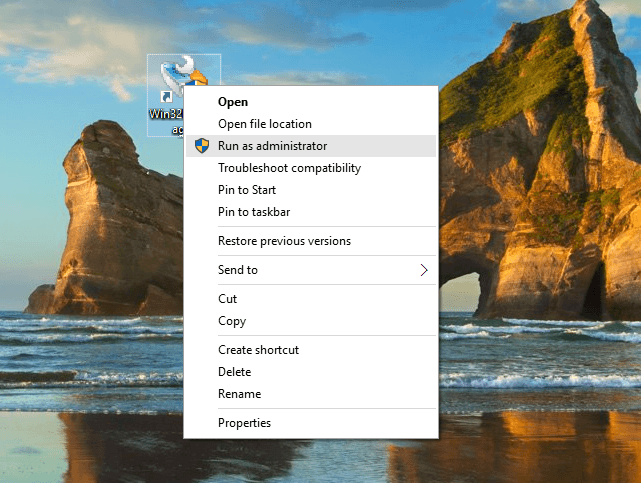
- On Windows 10 you might see a "CreateProcess failed; code 740." Error
- Right click on the icon & Run as administrator the Imager
- Select the downloaded file webc-VERSION.iso (you need to change the file filter to *.*) and target device, and click "Write" (Note: this will wipe all information you have on the selected USB stick. So be very careful to note the correct drive letter assigned to your USB stick at step.4)
- Remove your USB stick when the operation is complete

If you re-insert the USB key once specially formatted with Webconverger, Windows may ask if it should format the USB stick. Ignore this, it's because Windows doesn't understand the filesystem now on your USB stick.
Using MacOSX
Please follow our step-by-step MacOSX guide with pictures.
Using Linux
dmesg or fdisk -l will list your inserted USB drive - usually /dev/sdx ("x"
representing letter like sdb, sdc etc.).
sudo dd if=webc-VERSION.iso of=/dev/sdx
You might find specifying the additional argument bs=1M makes it faster & status=progress gives you a progress bar.
Configuring your PC to boot the USB key instead of your hard drive
Please refer to BIOS.
Making Webconverger automatically update
When you "image" the ISO to a USB or CD media using the instructions above and boot that media, that is effectively read only aka Live mode.
When you Install Webconverger from the Live media above, typically to that machine's hard drive or to another USB key, only then it will keep automatically up to date.